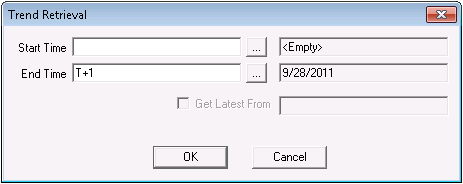
Important: Totalflow devices using the DB1 protocol do not support trending. The following topic only applies to devices using the DB2 or DB2 Enhanced protocols.
The Totalflow EIE provides various ways to request trends, depending on the Totalflow device model, the specified protocol, and the device's firmware version. DB2 protocol devices issue trend requests by time range. DB2 Enhanced protocol devices issue trend requests based on time range as well as sequence number range. Both protocols support the Get Latest From option.
The three data groups that define trend requests are "Trend List", "Trend Config", and "Trend - Device Specific". "Trend List" lists all of the trends created for a given device type. "Trend Config" enables you to configure "Trend - Device Specific" data groups and it generates configuration XML, which becomes available for viewing and editing. "Trend - Device Specific" collects and displays the retrieved trend data for a given trend.
For more information, see the following subsections below:
For more information, see Trend Tool.
The Get Latest From feature is part of the Time Range option. The Get Latest From feature retrieves trend data from the most recently cached trend timestamp. After you use the Time Range or Sequence Number Range option to poll history for the first time, a timestamp is cached in the remote device. The cached timestamp marks when the most recent poll occurred and when to begin the next Get Latest From poll.
After the initial poll, every time you poll using the Get Latest From option a new most recent trend timestamp is cached in the remote device. The only way you can establish a cached trend timestamp after the initial trend poll is by enabling the Get Latest From option. For instance, if you disable Get Latest From and enter a Start Time value and retrieve data, the data corresponds to the Start Time entered but the timestamp as indicated in the field beside Get Latest From does not change.
The Totalflow EIE device template files include a file that retrieves data from an ABB trend. This trend must be configured on the Totalflow remote device before it can be polled. Although CygNet provides alternate ways to trend field device data, trending at the remote device level in the Device Definition Service (DDS) is more reliable and precise since it does not depend on a communication device to constantly relay data.
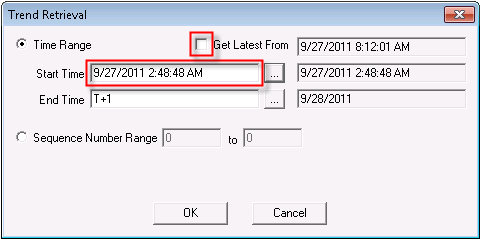
The following table lists and describes the properties found on the Trend Retrieval dialog box.
| Property | Description |
|---|---|
|
Time Range |
*DB1 and DB2 Enhanced. Retrieves trend data for a user-specified time range. Start Time may be a user-defined value or the Get Latest From value. The Get Latest From value retrieves trend data from the most recently cached trend timestamp and displays the latest timestamp in the Get Latest From field. The only way you can establish a cached trend timestamp after the initial trend poll is by enabling the Get Latest From option. You must always specify an End Date, regardless of how the start time is set. For more information, see Selecting Date and Time. |
|
Sequence Number Range n to n |
*DB2 Enhanced Only. Retrieves trend data based on a Totalflow sequence number range. This feature is useful for troubleshooting. To display sequence numbers for a given trend poll, click to check the Show All option on the trend data group's data dialog box. For more information about Totalflow sequence numbers, see Totalflow documentation or contact a Totalflow representative. |
To View or Edit Trend Data Group XML
Important: The following procedure is not supported; use it at your own risk.
Example
The following XML file is for a configured trend data group.
Note: The XML in the following example includes an off (offset) attribute. The off attribute only applies to DB2 Enhanced devices. The attribute indicates the byte offset of the value in the event record from the field device. If the off attribute is specified in DB2 Enhanced XML, trend retrievals are optimized by including only relevant data records and excluding data definition information, which is included without the use of the off attribute.
|
<TrendData dgCat="trend" canSend="false" canRecv="true" uccSend="false" uccRecv="true" niceName="\TREND\1111-01-01" cygUnits="true"> <dgElements secLev="4"> <Count desc="Count" type="ui2"/> <Time desc="Timestamp" type="r8"/> <Item00 desc="Nitrogen" type="r4" off="4" itemNum="0" unitsTf="%" units="%"/> <Item01 desc="Carbon Dioxide" type="r4" off="8" itemNum="1" unitsTf="%" units="%"/> <Item02 desc="Methane" type="r4" off="12" itemNum="2" unitsTf="%" units="%"/> <Item03 desc="Ethane" type="r4" off="16" itemNum="3" unitsTf="%" units="%"/> <Item04 desc="Propane" type="r4" off="20" itemNum="4" unitsTf="%" units="%"/> <Item05 desc="n-Butane" type="r4" off="24" itemNum="5" unitsTf="%" units="%"/> <Item06 desc="i-Butane" type="r4" off="28" itemNum="6" unitsTf="%" units="%"/> <Item07 desc="n-Pentane" type="r4" off="32" itemNum="7" unitsTf="%" units="%"/> <Item08 desc="i-Pentane" type="r4" off="36" itemNum="8" unitsTf="%" units="%"/> <Item09 desc="n-Hexane" type="r4" off="40" itemNum="9" unitsTf="%" units="%"/> <Item10 desc="n-Heptane" type="r4" off="44" itemNum="10" unitsTf="%" units="%"/> <Item11 desc="n-Octane" type="r4" off="48" itemNum="11" unitsTf="%" units="%"/> <Item12 desc="n-Nonane" type="r4" off="52" itemNum="12" unitsTf="%" units="%"/> <Item13 desc="n-Decane" type="r4" off="56" itemNum="13" unitsTf="%" units="%"/> <Item14 desc="Oxygen" type="r4" off="60" itemNum="14" unitsTf="%" units="%"/> <Item15 desc="Argon" type="r4" off="64" itemNum="15" unitsTf="%" units="%"/> <Item16 desc="Heavy Hydrocarbons" type="r4" off="68" itemNum="16" unitsTf="%" units="%"/> <Item17 desc="Heat Content" type="r4" off="72" itemNum="17" unitsTf="%" units="%"/> <Item18 desc="Specific Gravity" type="r4" off="76" itemNum="18" unitsTf="%" units="%"/> <Item19 desc="Log Period Seq #" type="ui2" off="80" itemNum="19"/> </dgElements> </TrendData> |

|
|
|

